What Is an RSS Feed and Why Should You Care?
RSS feeds are a simple way to take control of the content you consume online. Unlike algorithm-driven social media feeds that prioritize engagement over relevance, RSS delivers updates from your chosen sources in chronological order - no ads, no distractions, no manipulation. You decide what to follow, and the content comes directly to you.
Here’s why RSS feeds matter:
- No Algorithms: Updates are delivered as they’re published, without filters or engagement-based rankings.
- Time-Saving: All your updates are consolidated in one place, helping you avoid jumping between websites.
- Distraction-Free: RSS strips away ads, pop-ups, and endless scrolling, letting you focus on the content.
- Privacy-Friendly: RSS doesn’t track your behavior or collect data.
To get started, choose an RSS reader, find feeds from your favorite websites, and organize them into categories. It’s a straightforward way to simplify your digital life while staying informed.
RSS Feeds: The Better Way To Consume
sbb-itb-d395ae5
What Is an RSS Feed?
An RSS feed is essentially a plain-text file that websites use to share updates in a consistent format. RSS stands for Really Simple Syndication, though it has also been referred to as RDF Site Summary and Rich Site Summary over the years. Think of it as a direct connection between content creators and their audience, sidestepping algorithms and other intermediaries.
It works like an online newswire. When a website posts new content - whether it’s an article, podcast, or blog post - it updates an XML file hosted at a fixed URL. Your RSS reader checks this URL at intervals, spots any new updates, and delivers them directly to you. Unlike push notifications that can feel overwhelming, RSS operates on a pull system, giving you control over when and how often you receive updates.
The backbone of RSS is XML (Extensible Markup Language), which ensures that feeds are consistently formatted and easy to interpret across various platforms. This standardized structure is what makes RSS so dependable, whether you’re using a desktop app, a mobile reader, or even automation tools.
A Brief History of RSS
RSS was introduced in March 1999 when Netscape launched version 0.90 as a tool to organize and distribute web content. Over time, the format split into two directions: one branch focused on RDF (Resource Description Framework), while another, led by Dave Winer, emphasized simplicity. By 2007, RSS 2.0 had become the dominant version, accounting for 67% of global usage, with RSS 1.0 holding 17% and older versions making up the rest.
The recognizable orange RSS icon was designed by Stephen Horlander in September 2004 for the Mozilla Firefox browser. At its height in August 2008, Syndic8.com tracked 546,069 feeds - about 80% were in RSS formats, and 16% used Atom. Although browsers like Chrome and Firefox removed native RSS support between 2013 and 2018, interest has rebounded. In 2021, Microsoft Edge and Google Chrome for Android reintroduced “follow” features powered by RSS.
How an RSS Feed Is Structured
RSS feeds follow a clear hierarchical structure, making them easy for software to read. At the top level, there’s a channel that holds metadata about the source, such as the site’s title, description, and URL. Inside the channel are individual items, each representing a piece of content. These items include:
- A title
- A link to the full content
- A description (either a summary or the full text)
- A publication date (
pubDate) showing when it was posted - A GUID (Globally Unique Identifier) to help readers identify new versus previously seen items
This structured format is highly portable. Since everything is wrapped in XML tags, the same feed can be used across different readers, operating systems, and even AI tools that rely on RSS for data. There’s no proprietary format or vendor lock-in - just clean, standardized information that works wherever you need it.
How RSS Feeds Work
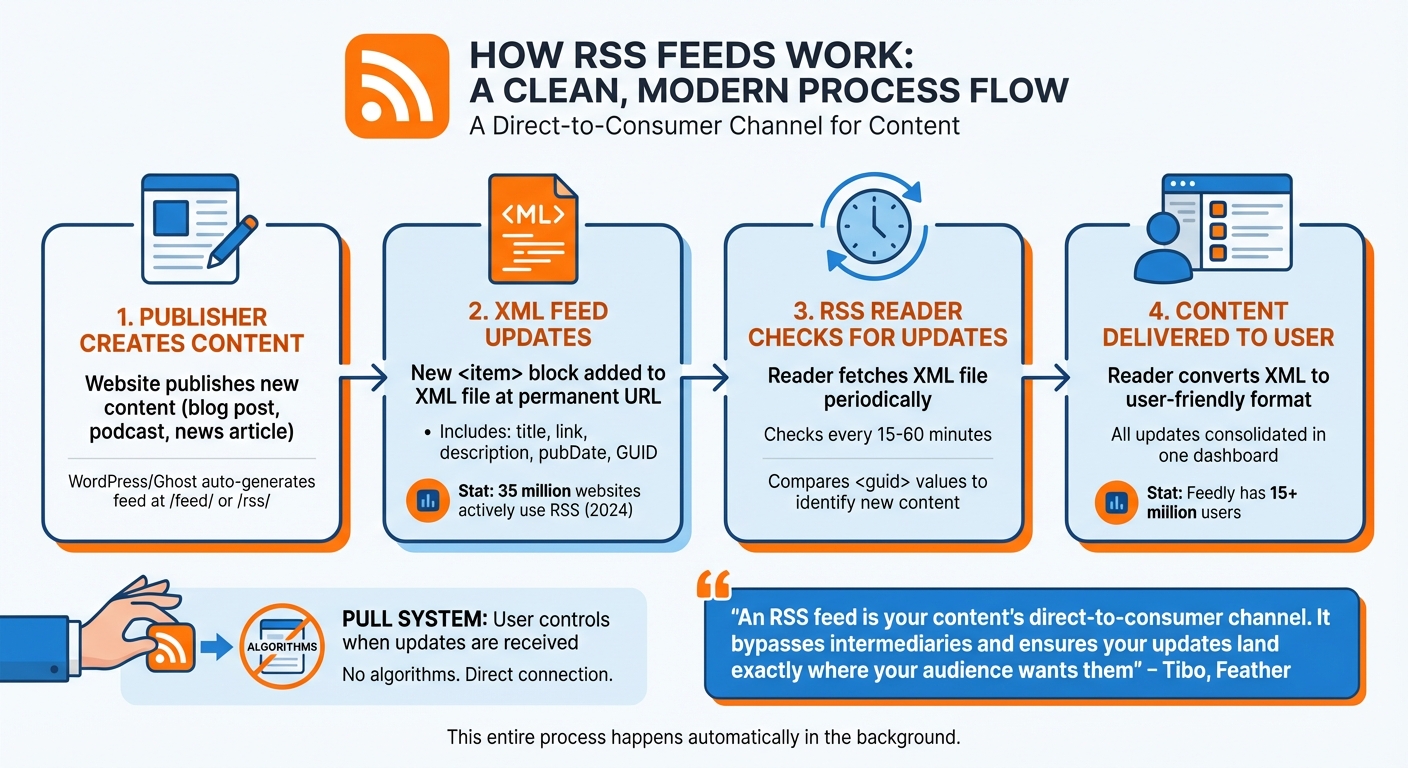
How RSS Feeds Work: From Publisher to Reader
Content Delivery Made Simple
It all begins with the publisher. When a website releases new content - whether it’s a blog post, podcast episode, or news article - it updates an XML file located at a permanent URL. Platforms like WordPress and Ghost handle this automatically, generating feeds at URLs like /feed/ or /rss/. For custom-built websites, server-side scripts are often used to dynamically create the XML.
Every time new content is published, a fresh <item> block is added to the top of the XML file. The <guid> field is especially important because it ensures users don’t get duplicate notifications if a headline is updated or the feed order changes. As of 2024, about 35 million websites actively use RSS to distribute their content.
"An RSS feed is your content's direct-to-consumer channel. It bypasses intermediaries and ensures your updates land exactly where your audience wants them, every single time." - Tibo, Writer, Feather
After the feed is updated, RSS readers fetch these new entries and display them effortlessly.
The Role of RSS Readers
Once the feed is updated, RSS readers take over and ensure the content reaches you without a hitch. These readers check for updates every 15 to 60 minutes. When they fetch the XML file, they compare the <guid> values of each item with their stored data to identify what’s genuinely new.
The reader then converts the XML into a user-friendly format, presenting all your updates in one consolidated dashboard. This streamlined process makes it easy to stay focused on the content without unnecessary distractions. On top of that, RSS readers keep track of what you’ve already read and what’s still waiting for you, so you can pick up where you left off. Popular services like Feedly, which now has over 15 million users, thrive on this centralized approach.
"The reader parses the retrieved data from the RSS feed, extracting information such as titles, summaries, links, and publication dates." - Feedlink
Why You Should Use RSS Feeds
Control Your Information Diet
In today’s world of endless digital distractions, RSS feeds give you the power to take charge of your information intake. With RSS, you pick your sources directly - no algorithms deciding what you see. Updates come straight from the publisher, free from the influence of ad-driven filters or engagement-based suggestions. This means you get exactly what you want, without the noise or irrelevant content cluttering your feed.
Reduce Information Overload
Modern web pages can feel like a minefield of pop-ups, ads, and tracking tools, but RSS readers strip all that away. They deliver content in a clean, text-focused format that’s easy to read. Unlike social media platforms, which encourage endless scrolling, RSS feeds have a clear stopping point. Once you’ve gone through your updates, you’re done. This structure helps you avoid the trap of mindless scrolling, making your reading time more intentional and productive.
Support Independent Thinking
RSS feeds encourage you to think critically by giving you full control over your content sources. Instead of relying on algorithms that push viral or sensational content, you can choose sources that align with your values and priorities.
"What if you could take all your favorite newsletters, ditch the data collection, and curate your own newspaper? ... Only the stuff you want to see, all in one place, ready to read at your convenience." - Molly White
Getting Started with RSS Feeds
Choosing an RSS Reader
The first step in using RSS feeds is picking the right reader for your needs. If you're juggling hundreds of feeds, you'll want a tool with advanced filtering and organizational options - Inoreader is a great choice for managing high-volume content with precision. On the other hand, writers and developers who value simplicity might prefer minimalist readers like Feedbin, which offers a clean interface without distractions like social metrics or AI-generated summaries.
Consider the platform, too. Cloud-based services allow for seamless syncing across devices, while desktop apps prioritize local privacy and speed. Most RSS readers provide free tiers (usually supporting 64–150 feeds) or trial versions, so you can test them out before committing to a subscription. Also, ensure your chosen reader supports OPML export - this feature allows you to easily transfer your feed collection to another service if you decide to switch later.
To avoid information overload, stick to a curated list of feeds. Once you've chosen your reader, it's time to find and subscribe to content that truly matters to you.
Finding and Subscribing to RSS Feeds
Many websites offer RSS feeds, though they can sometimes be tricky to locate. Look for the familiar orange RSS icon or a button labeled "XML." If you can't find one, try adding /feed, /rss, or /feed.xml to the site’s base URL in your browser. For hidden feeds, you can inspect the page source by right-clicking, selecting "View Page Source", and searching (Ctrl+F on Windows, Cmd+F on Mac) for type="application/rss+xml" to locate the feed link.
Once you have the feed URL, paste it into your reader's subscription field. Alternatively, search for the website name directly within the reader. For platforms like X (formerly Twitter) or Instagram that lack native RSS support, you can use third-party tools like RSS.app to generate a compatible feed.
Organizing and Maintaining Your Feed
To get the most out of your RSS feed, organization is key. Group feeds into categories based on topics, so you can quickly browse headlines by interest. Use keyword filters or custom rules to highlight specific authors or topics while filtering out irrelevant content - this is particularly useful for high-traffic feeds.
Regularly review your subscriptions to keep your feed streamlined. Remove inactive feeds or those that no longer serve your interests. If a folder becomes overwhelming, don’t hesitate to use the "mark all as read" feature to reset and start fresh. The goal is to create a focused, manageable content stream that adds value to your day without becoming another source of stress.
Building a Personalized Content Strategy
Selecting the Right Sources
Now that you see how powerful RSS can be, it’s time to fine-tune your feed by choosing sources that align with your specific interests and goals. Instead of subscribing to entire websites, focus on feeds tailored to particular tags, categories, or even individual authors. For instance, if cybersecurity is your thing but general tech news isn’t, subscribe only to the AppSec section of a publication rather than its full feed.
Variety is key. Convert email newsletters into RSS feeds using tools like Kill the Newsletter to declutter your inbox and keep everything in one place. For platforms like X (formerly Twitter), Instagram, or LinkedIn that don’t natively support RSS, third-party tools can help you turn public profiles into structured feeds.
You can also use browser extensions to uncover hidden RSS feeds in a site’s HTML. Many sites still offer feeds even if they aren’t prominently advertised. If no link is obvious, try common paths like /feed/, /rss/, or /feed.xml.
By carefully selecting your sources, you’ll create a streamlined, effective feed that’s easy to manage.
The Benefits of a Minimalist Feed
Adding more subscriptions won’t necessarily improve your experience. In fact, a smaller, carefully curated list of sources can help you stay focused and avoid information overload. Jessica Greene from Zapier explains:
"Finding useful information and taking in quality news means proactively shutting out the noise. And RSS feeds can help you do that".
Avoid overcomplicating things with dozens of hyper-specific categories. This can create unnecessary mental clutter without adding much value. Instead, organize your feeds into broader folders based on how you process information. For example, you might group content by subject (like Market Trends or Competitor News) or by mood (such as Uplifting or Deep Dive).
Integrating RSS Feeds into Your Daily Routine
Once your sources are set and organized, make RSS a part of your daily rhythm. Dedicate 20 minutes each day - perhaps in the morning or during lunch - to browse headlines and summaries. Use your reader’s read/unread tracking to pick up right where you left off without wasting time.
For longer articles, send them to tools like Pocket or Instapaper for later reading. You can also connect your RSS feed to task management apps like Todoist or Google Tasks to instantly turn interesting articles into actionable tasks. Some users even integrate AI to summarize daily updates from their feeds, making it easier to stay on top of new content.
Keep your feed fresh by regularly reviewing your subscriptions. Remove inactive feeds, and don’t hesitate to use the “mark all as read” option to clear out overwhelming folders. Your RSS feed should grow and adapt as your interests and professional goals evolve, ensuring it remains a valuable resource rather than just another neglected tool.
Conclusion
RSS feeds put you in charge of what you read and when you read it. Unlike algorithm-driven platforms, RSS lets you handpick your sources and delivers updates in the exact order they’re published. As tech writer René Ramos explains, "No one is choosing what you see but you - you have more control over your news diet, free from any choices made by an algorithm".
On top of that, RSS consolidates all your updates into one simple dashboard, letting you skim through hundreds of headlines in minutes. It eliminates the need to hop between dozens of websites and offers a streamlined, distraction-free browsing experience. Plus, your reader keeps track of what you’ve already seen, so you’re not wasting time revisiting old content.
As we head into 2026, with social platforms becoming more fragmented and restrictive, RSS stands firm as an open, dependable standard. It maintains your direct connection with publishers, ensuring your content stays tailored for thoughtful consumption. Far from being outdated, RSS serves as a powerful tool for anyone prioritizing focus, efficiency, and intentional browsing.
If you're feeling overwhelmed by endless feeds designed to keep you scrolling, RSS might be the reset button you need. Start by choosing a reader, subscribing to a few trusted sources, and taking back control of your digital space. You’ll soon see why this technology has quietly endured for over two decades and why it’s more relevant than ever today.
FAQs
Is RSS still worth using in 2026?
RSS continues to hold its value in 2026 by providing a straightforward, algorithm-free way to keep up with your favorite content. It allows you to cut through the noise of endless feeds, giving you control over what you consume. This makes RSS a powerful tool for staying informed and focused in today’s fast-moving digital landscape.
How do I find a site’s RSS feed URL?
To locate a site’s RSS feed URL, start by checking the page source. Right-click on the webpage, choose “View page source” (or use Ctrl+U on Windows or Cmd+U on Mac), and search for the term “RSS.” For many WordPress sites, you can also try adding /feed or /rss at the end of the site’s URL. Alternatively, browser extensions or specialized tools can automatically detect RSS feeds for you.
What’s the best way to avoid RSS overload?
To keep your RSS feeds manageable, focus on filtering and curating what you consume. Set up filters to prioritize the most relevant and reliable content, ensuring you only see what truly matters. Additionally, take time to review your subscriptions regularly - remove or combine feeds that no longer serve your interests or objectives. These steps can help you minimize mental clutter and create a more focused, tailored content experience.
See also: RSS Feed Readers for Intentional Reading — tools to make the switch.
Want a feed that respects your attention? Try Fifteen →
See also: The Fifteen Manifesto — why we built an RSS-first, algorithm-free reader.