Digital Minimalism Checklist: Reclaim Your Attention
Digital minimalism helps you focus on what matters by cutting out digital clutter and distractions. This guide offers practical steps to protect your attention, boost productivity, and create a more intentional relationship with technology.
Key Takeaways:
- Declutter Your Devices: Delete unused apps, organize files, and clear your desktop regularly.
- Manage Notifications: Silence non-essential alerts and batch-process emails.
- Streamline Social Media: Mute or unfollow accounts that don’t add value and use tools like News Feed Eradicator.
- Backup and Secure Data: Use password managers, enable two-factor authentication, and set up both cloud and hardware backups.
- Daily and Weekly Habits: Spend 5 minutes daily tidying your digital space and review goals quarterly.
Start small: Turn off one notification, delete five apps, or set a phone curfew tonight. These changes can free up hours for deeper focus and meaningful activities.
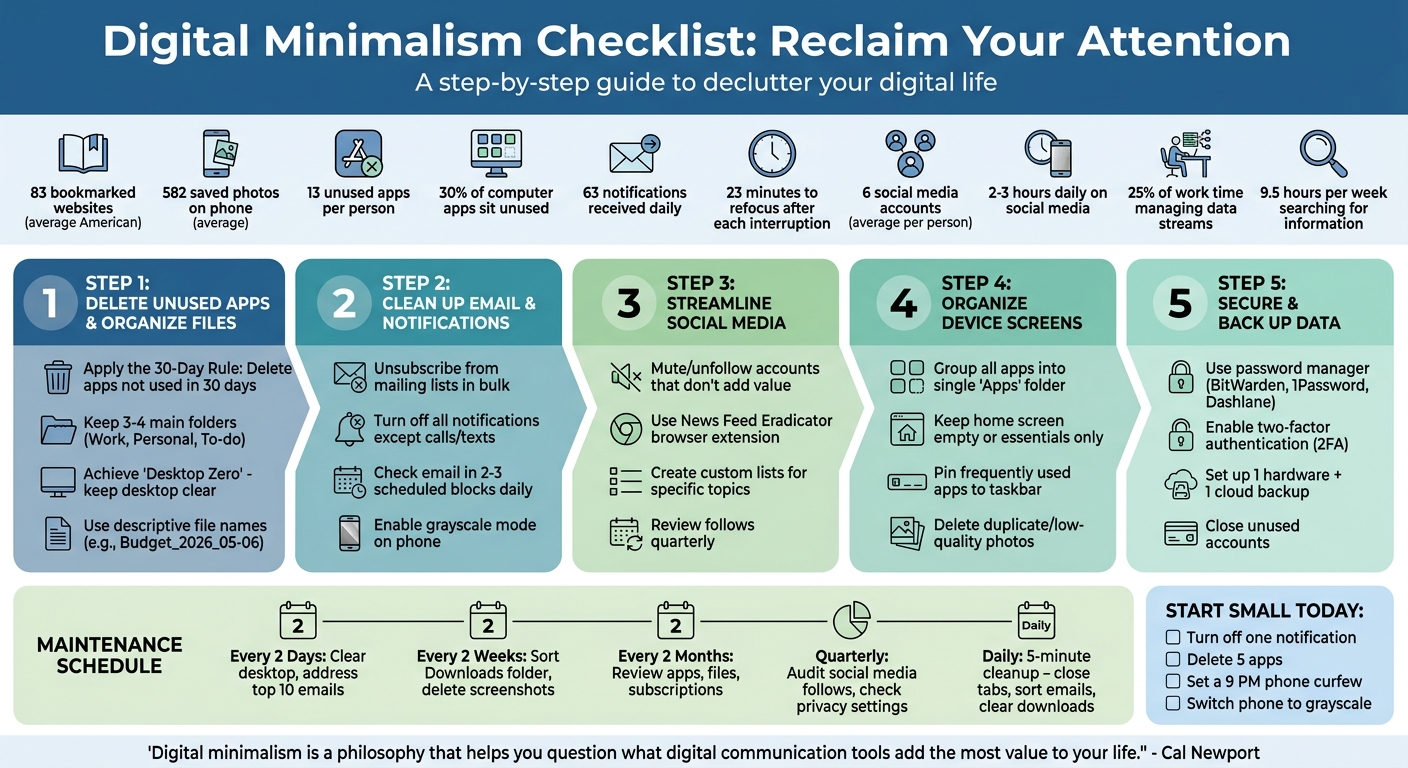
Digital Minimalism Checklist: 5-Step Guide to Declutter Your Digital Life
Getting Ready to Declutter Your Digital Life
Find Your Digital Stress Points
Before diving into decluttering, take a moment to figure out what’s causing you the most digital stress. Spend 10–15 minutes assessing areas like your email, photos, or social media. Rate each on a scale from 1 (totally manageable) to 5 (completely overwhelming). The highest scores will show you where to start. Here’s a helpful question: "What part of my digital clutter do I avoid the most?" That avoidance often reveals your biggest stressor.
For example, did you know the average American has about 83 bookmarked websites, 582 saved photos on their phone, and 13 unused apps? On top of that, nearly 30% of computer apps just sit there, unused.
"Saving less is gentler than organizing more when it comes to digital clutter."
– Courtney Carver
Pay attention to how you feel physically, too. If you’re constantly distracted, feeling drained, or easily irritated, it might be a sign your digital life needs some attention. Struggling to find files or information on your devices? That’s another clue that your system could use some work.
Once you’ve pinpointed your stress points, it’s time to set clear goals for tackling them.
Set Your Declutter Goals
Now that you know where to focus, set specific goals to address your top digital clutter areas. Instead of just deleting things, think about what truly adds value to your life. Keep tools and apps that support your priorities and help you stay focused.
"Decluttering is like a magic wand to your mental health…If you spend a couple of minutes decluttering before you start working, 'it's going to pave the way for the rest of your day to be much more productive.'"
– Dr. Susan Albers, Psychologist, Cleveland Clinic
Don’t feel pressured to tackle everything at once. Break it down into manageable 10-minute sessions. Start with the area that stresses you out the most - your overflowing inbox, cluttered photo gallery, or endless notifications - and make it your first target.
For the apps you decide to keep, set clear rules about how and when you’ll use them. You might also try taking a 24-hour break from screens - a "digital Sabbath" - to reset your focus. And if your email feels completely unmanageable, consider an "inbox bankruptcy": archive everything and start fresh.
With your goals in place, it’s time to gather the tools you’ll need to make progress.
Gather Your Tools
Before you start decluttering, make sure you have the right tools lined up. Begin by setting up a solid backup system. A good rule of thumb? Use one hardware backup (like an external drive) and one cloud solution. Popular cloud storage options include Dropbox, Google Drive, iCloud, and OneDrive. For online backups, consider services like iDrive, Carbonite, or Backblaze.
A password manager is another must-have. Tools like BitWarden, 1Password, or Dashlane not only keep your accounts secure but can also help you identify accounts you no longer need. To manage digital distractions, try "read-it-later" apps like Pocket, Instapaper, or OneTab to save articles and avoid endless scrolling on social media.
| Tool Category | Recommended Resources |
|---|---|
| Password Management | BitWarden, 1Password, Dashlane |
| Cloud Storage | Dropbox, Google Drive, iCloud, OneDrive |
| Online Backup | iDrive, Carbonite, Backblaze |
| Content Management | Pocket, Instapaper, OneTab |
| Task Management | Todoist, physical journals |
To stay focused, consider using browser extensions like News Feed Eradicator to block distracting content. You can also enable grayscale mode on your phone to make apps less visually tempting. Keep a small notebook handy - a "Noticing Notebook" - to jot down ideas or note areas of stress without needing to grab your device. Before reorganizing files, sketch out a simple folder system, like "Work" and "Personal." And to keep your energy up, try using a timer to work in 25-minute bursts. This way, you can stay productive without burning out.
sbb-itb-d395ae5
The Digital Minimalism Checklist
Delete Unused Apps and Organize Files
Start with the 30-Day Rule: if you haven't used an app in the past 30 days, delete or hide it. For desktop programs, disable non-essential ones to improve system performance.
When organizing files, keep things simple. Stick to 3 or 4 main folders, like "Work", "Personal", and "To-do." Use clear, descriptive names for your files (e.g., "Budget_2026_05-06") and rely on your storage system's search tools to locate files by date or keyword.
Treat your desktop as a temporary workspace, not a dumping ground. Once you're done with a file, move it to a proper folder or cloud storage. Aim for "Desktop Zero" by keeping your desktop clear. Set a recurring reminder to clean out your Downloads folder and empty the Recycle Bin to prevent digital clutter from piling up.
After tidying your files, shift your attention to emails and notifications.
Clean Up Email and Turn Off Notifications
Simplify your inbox by unsubscribing from mailing lists in bulk and setting up auto-archive or delete rules. If your inbox feels overwhelming, archive everything and start fresh - you can always search for older emails when needed.
"The inbox is not a storage unit for unloved emails."
– Patty Kreamer, Productivity Coach
Turn off notifications for everything except personal calls and texts. Studies show the average person gets 63 notifications daily, and each interruption takes about 23 minutes to refocus. Silence social media alerts, set email to manual fetch, and enable grayscale mode on your phone to make it less visually tempting. Try checking email on your laptop instead of your phone and process emails in 2–3 scheduled blocks each day to stay on top of things without constant interruptions.
Once your email and notifications are under control, it's time to tackle your social media feeds.
Clean Up Your Social Media Feeds
Mute or unfollow accounts that don't add value to your life. On Instagram, use the mute feature for stories to reduce clutter without unfriending anyone. Create custom lists on platforms like Facebook or Twitter to follow specific topics without scrolling through the main feed. Bookmark key pages like Events or Groups to bypass the algorithm entirely.
Browser extensions like News Feed Eradicator can replace your social media feed with motivational quotes, helping you avoid endless scrolling. Instead of checking social media during idle moments, schedule dedicated time blocks for it. Moving social media access from mobile apps to desktop browsers can also make it less automatic and more intentional.
Review your follows every few months to ensure they still align with your interests. On average, people use 6 social media accounts and spend 2–3 hours daily on them. Cutting back even slightly can free up a surprising amount of time and mental space.
Organize Your Device Screens
For mobile devices, group all apps into a single "Apps" folder on an inner screen, leaving your home screen empty or limited to essentials like Notes and Camera. This setup encourages more deliberate app use. On your desktop, pin frequently used apps to the taskbar while keeping others out of sight.
A clean screen layout reduces distractions and helps you focus. Use built-in tools on your phone to identify and delete duplicate or low-quality photos, then transfer the rest to cloud storage to save space.
Secure and Back Up Your Data
Decluttering isn't just about organization - it’s also about keeping your data safe. Use a password manager to create strong passwords and identify accounts you no longer need. Close unused accounts to shrink your digital footprint and reduce security risks. For key accounts, enable two-factor authentication (2FA) for added protection.
Set up a backup system that includes both a hardware option (like an external drive) and a cloud solution like Google Drive, iCloud, or OneDrive. Schedule automatic backups so you don’t have to think about it. A secure, backed-up system helps maintain a stress-free digital environment.
| Cadence | Routine Task |
|---|---|
| Every 2 days | Clear the desktop and address the top 10 emails. |
| Every 2 weeks | Sort through the Downloads folder and delete unnecessary screenshots. |
| Every 2 months | Review apps, files, and recurring subscriptions. |
| Quarterly | Audit your social media follows and check privacy settings. |
Use Fifteen for Focused Content Consumption
What Fifteen Does
Fifteen is a read-only feed reader built with digital minimalism in mind. Instead of overwhelming you with notifications or algorithm-driven suggestions, it allows you to follow up to 15 carefully selected sources. These can include blogs, YouTube channels, Substacks, or any site that supports RSS feeds. The platform delivers your chosen content in a straightforward, chronological feed - completely free from ads, tracking, or engagement features. You decide what matters, and Fifteen ensures it’s presented in the order it was published.
How Fifteen Helps You Stay Focused
Digital minimalism thrives on using only a few tools that align with your priorities. By limiting your follows to 15 sources, Fifteen encourages you to focus on the ones that truly add value - essentially applying the 80/20 rule, where 20% of your sources provide 80% of the benefits. Research shows that knowledge workers spend 25% of their time managing data streams and an average of 9.5 hours per week just searching for information. Fifteen helps you avoid this by replacing endless scrolling with intentional reading habits. For example, you can dedicate 20 minutes after lunch to review your feed, transforming reactive habits into purposeful consumption.
Fifteen Plans and Pricing
Fifteen offers two straightforward plans. The Free plan lets you follow up to 5 sources and save up to 5 items, making it an excellent way to try the platform. The Pro plan, priced at $7/month or $70/year, expands your access: follow up to 15 sources, save an unlimited number of items, and use full-text search across all your saved content. Both plans promise a distraction-free experience with no ads, algorithms, or tracking.
| Plan | Price | Follows | Saves | Search |
|---|---|---|---|---|
| Free | $0 | Up to 5 | Up to 5 | No |
| Pro | $7/month or $70/year | Up to 15 | Unlimited | Yes |
Once you’ve set up your feed on Fifteen, keep your digital space organized with regular daily and monthly cleanups.
My Guide to Digital Minimalism
Keep Your Digital Space Clean
Maintaining a clutter-free digital environment isn’t a one-and-done task - it’s something that calls for consistent effort. After your initial decluttering, setting aside just a few minutes each day can help keep digital chaos at bay.
Daily 5-Minute Cleanup
Once your digital space is organized, a short daily routine can help keep it that way. Start by closing unnecessary browser tabs - try to keep it to five or fewer. Sort through your emails to keep your inbox tidy, and silence notifications or direct messages to maintain focus for the day ahead. Make it a habit to clear out your Downloads folder and Recycle Bin regularly. You might also consider setting a "phone curfew", like no screens after 9:00 PM, and using a physical alarm clock to avoid late-night scrolling.
When you spot unwanted emails or newsletters, don’t just delete them - unsubscribe on the spot. This small habit of micro-decluttering, done in quick 10-minute bursts, makes the process manageable and less overwhelming.
Weekly and Monthly Tasks
On a weekly basis, revisit your digital declutter checklist. Back up important files, unsubscribe from mailing lists you’ve lost interest in, and upload photos to the cloud while deleting any duplicates. Monthly tasks could include clearing out temporary files, like old event schedules or unused documents. These steps help ensure your digital space stays in sync with your minimalist goals.
Quarterly Reviews
Every three months, dive a little deeper into your digital habits. Reassess your decluttering goals to make sure your digital tools and environment still align with your priorities. Take a look at your social media accounts and unfollow anything that no longer resonates with you. Delete unused apps and sort through older files to free up storage. Review your phone’s screen time report to understand where your attention is going, and make adjustments to your habits if necessary. Lastly, evaluate your apps with a simple question: does this support what matters most to me? If not, archive or delete it. This approach ensures your technology works for you - not the other way around.
Conclusion
What to Remember
Digital minimalism is all about using technology with purpose. The checklist you've been working through helps you keep only the tools that align with your values while letting go of the rest. Every app, notification, or device you hold onto demands a share of your attention - so it’s worth keeping only what truly serves you.
The idea isn’t to eliminate everything but to use your tools more effectively. For example, batch-process your emails instead of checking constantly, silence notifications that aren’t from real people, and keep your phone’s home screen limited to essential tools. These small changes can make a noticeable difference. Studies show that digital interruptions can significantly delay your ability to return to focused, meaningful work. Protecting your attention isn’t a luxury - it’s necessary if you want to get important things done.
"Digital minimalism is a philosophy that helps you question what digital communication tools (and behaviors surrounding these tools) add the most value to your life." - Cal Newport, Author and Professor
Consistency is just as important as your initial cleanup. Simple habits like a daily 5-minute digital cleanup, weekly reviews, and quarterly check-ins can help you avoid “clutter creep” and keep your progress intact. By sticking to these practices, you could reclaim one to three hours of your day. Imagine dedicating that time to deep work, connecting with loved ones, or simply clearing your mind.
Take Your First Step Today
It’s time to act. You don’t need to overhaul everything - just take one small step right now. Turn off non-essential notifications. Delete five apps you haven’t opened in weeks. Set a phone curfew for 9:00 PM tonight. Or try switching your phone to grayscale mode.
Constantly checking your phone makes it harder to focus and stay in the zone. But by making one deliberate change today, you can start breaking that habit. Pick a step from the list and see how reclaiming your digital space can help you regain your focus and clarity.
FAQs
What should I declutter first if everything feels overwhelming?
If you're feeling swamped by digital clutter, begin with the areas that demand the most attention, such as your email inbox, app notifications, or social media accounts. Start by clearing out unnecessary emails, disabling notifications that aren't essential, and curating your social media feeds. These simple steps can help create a more peaceful digital space, making it less daunting to address other cluttered areas over time.
How can I reduce notifications without missing anything important?
To reduce interruptions but stay in the loop, focus on keeping only the notifications that truly matter. Go through your settings and disable alerts that aren't urgent or helpful. You can also streamline your digital tools and create clear boundaries to cut down on distractions. By being deliberate about how you use technology, you can concentrate on what’s important without getting sidetracked by constant pings.
How do I choose my 15 sources in Fifteen?
To pick your 15 sources, concentrate on tools and platforms that match your personal values and objectives. Begin by listing the digital tools you currently use. Then, focus on those that deliver clear benefits, such as helping you save time or spark creativity. Narrow it down to the 15 that truly make a difference in your life. Digital minimalism is all about prioritizing quality over quantity, so make thoughtful choices to enhance your focus and productivity.
See also: Why Your Feed Should Have a Limit — the digital minimalism foundation.
Reclaim your digital life. Try Fifteen →